

Panduan Artwork Spot UV & Hot Foil Stamping
← Lihat Semua Panduan Sokongan Percetakan
Panduan Artwork Kemasan Premium Image Magic
Sediakan Artwork Spot UV dan Hot Foil Stamping Tanpa Masalah Alignment
Spot UV dan hot foil stamping memerlukan artwork produksi berasingan selain daripada rekaan CMYK biasa. Setiap mask kemasan mesti sepadan tepat dengan saiz, kedudukan dan orientasi halaman cetakan.
Keperluan Ringkas Artwork
Templat produk dan pilihan tempahan yang dipilih sentiasa mengambil keutamaan. Hubungi Image Magic sebelum menyediakan kemasan dua muka, kesan sehingga ke tepi atau butiran yang sangat halus.
Spot UV dan Hot Foil Stamping Ialah Kemasan yang Berbeza
Spot UV
Spot UV menambahkan lapisan berkilat jernih pada kawasan terpilih. Artwork CMYK di bawah masih kelihatan, jadi mask UV boleh diletakkan tepat di atas teks, logo, corak atau imej bercetak.
Hot Foil Stamping
Hot foil stamping memindahkan foil metalik atau berwarna yang legap ke kawasan terpilih. Objek foil biasanya perlu dibuang daripada halaman produksi CMYK sebenar supaya tiada warna cetakan yang tidak dikehendaki di bawah foil.
Pembetulan penting: Untuk hot foil stamping, halaman yang menunjukkan rekaan lengkap bersama elemen foil hanyalah rujukan visual. Halaman produksi CMYK sebenar perlu membuang objek yang akan di-foil, kemudian diikuti dengan halaman mask foil hitam solid yang berasingan.
Cara Membina Mask Kemasan
| Keperluan mask | Persediaan betul | Elakkan |
|---|---|---|
| Jenis artwork | Path vector dan teks yang telah di-outline | JPEG, screenshot, PNG resolusi rendah atau teks raster |
| Warna mask | C0 M0 Y0 K100 | Rich black, hitam RGB, kelabu, warna lain atau transparency |
| Fill | Fill solid 100% | Gradient, tint, shadow, blur, feather atau transparency |
| Stroke | Expand atau outline stroke sebelum eksport | Hairline atau appearance effect yang belum dikembangkan |
| Kedudukan | Sejajar tepat dengan halaman artwork CMYK | Menggerakkan, mengubah saiz, memutar atau crop halaman mask |
| Saiz halaman | Saiz trim, bleed dan orientasi yang sama pada setiap halaman | Artboard berbeza atau bleed yang tidak konsisten |
Warna hitam solid ialah arahan produksi dan tidak akan dicetak sebagai hitam pada produk siap. Ia menunjukkan lokasi Spot UV atau foil perlu digunakan.
Elakkan garisan terlalu nipis, ruang reverse yang sangat kecil dan teks terlalu halus. Sedikit pergerakan registration boleh menyebabkan kemasan halus kelihatan tidak sekata. Gunakan templat produk atau dapatkan pengesahan produksi bagi rekaan yang rumit.
Susunan Halaman PDF untuk Spot UV
Produk cetakan satu muka dengan Spot UV pada muka tersebut
Produk cetakan dua muka dengan Spot UV pada bahagian depan sahaja
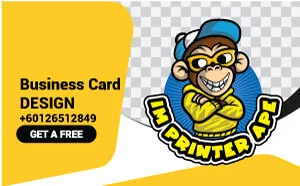

Artwork CMYK di bawah Spot UV biasanya perlu dikekalkan kerana Spot UV ialah lapisan jernih. Jangan buang objek bercetak kecuali rekaan memang memerlukan kesan gloss di atas kawasan yang tidak dicetak.
Susunan Halaman PDF untuk Hot Foil Stamping
Produk cetakan satu muka dengan foil pada muka tersebut
Produk cetakan dua muka dengan foil pada bahagian depan sahaja
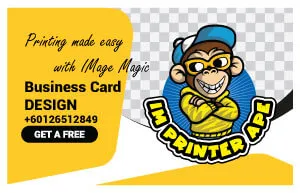

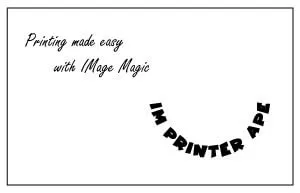
Produk dua muka memerlukan halaman CMYK belakang yang berasingan. Contoh hot foil tiga halaman hanya lengkap untuk produk cetakan satu muka. Tambahkan artwork CMYK belakang sebagai Halaman 4 apabila produk dicetak dua muka.
Zon Selamat, Tepi, Lipatan dan Perforasi
Pastikan Spot UV dan hot foil stamping berada sekurang-kurangnya 3 mm di dalam cutter guide. Jarak tambahan adalah lebih selamat berhampiran bucu bulat, crease, lipatan, perforasi, scoring dan tepi yang kerap disentuh.
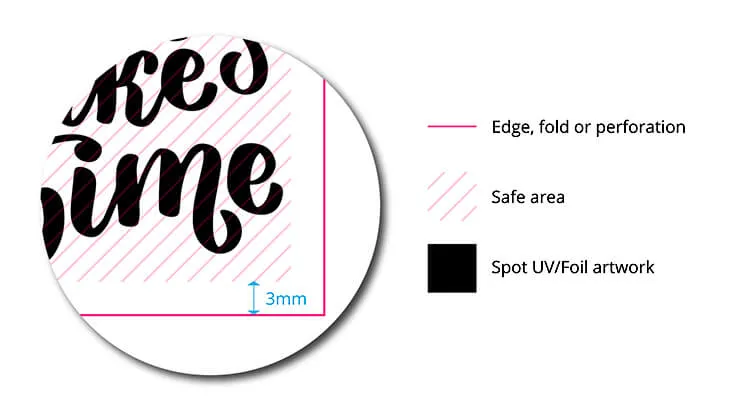
Tepi potongan
Kemasan terlalu dekat dengan tepi boleh dipotong, sumbing atau kelihatan tidak sekata.
Lipatan dan crease
Lapisan UV atau foil yang merentasi lipatan boleh retak, pecah atau flaking.
Perforasi dan tebuk lubang
Jauhkan mask daripada perforasi, lubang drill dan kedudukan finishing mekanikal lain.
Pertimbangan Reka Bentuk dan Registration
- Jangan gunakan Spot UV atau foil sebagai outline hairline pada teks kecil atau logo nipis.
- Elakkan mask yang memerlukan alignment sempurna dengan border bercetak yang terlalu halus.
- Pastikan ruang kecil dan reverse area cukup besar supaya tidak tertutup selepas finishing.
- Tukarkan semua teks mask kepada outline dan expand stroke atau appearance effect.
- Gunakan satu bentuk solid yang berterusan apabila boleh dan elakkan terlalu banyak objek bertindih.
- Semak halaman depan, belakang dan mask mempunyai orientasi serta page box yang sama.
- Jangan masukkan crop mark, colour bar atau nota templat kecuali diminta oleh templat produk.
- Kesesuaian kemasan bergantung pada jenis kertas, laminasi, coating dan pilihan produk.
Sedikit perbezaan registration antara cetakan dan finishing boleh berlaku. Rekaan yang mempunyai toleransi kecil biasanya lebih selamat berbanding kesan yang memerlukan alignment tepat pada tahap piksel.
Arahan Eksport dan Muat Naik
Halaman cetakan CMYK
Eksport sebagai PDF berkualiti cetak dengan saiz siap, bleed, warna CMYK serta font embedded atau outline. Imej raster perlu mempunyai effective resolution yang sesuai pada saiz akhir.
Halaman mask kemasan
Kekalkan mask sebagai vector, K100 solid dan sejajar tepat dengan halaman CMYK. Jangan flatten mask menjadi JPEG.
Nama fail
Gunakan nama jelas seperti Front-CMYK, Front-SpotUV, Front-Foil-Mask dan Back-CMYK.
Fail berasingan
Satu PDF berbilang halaman adalah pilihan terbaik. Jika fail berasingan, masukkan semuanya dalam satu fail ZIP.
Sebelum memuat naik, buka PDF akhir dan bandingkan setiap mask kemasan dengan halaman CMYK yang sepadan pada zoom yang sama. Kedudukan, saiz dan orientasi mesti sepadan tepat.
Kesilapan Artwork yang Biasa
Senarai Semak Artwork Akhir
Soalan Lazim
Adakah mask hitam solid akan dicetak sebagai warna hitam?
Tidak. Ia hanyalah arahan produksi yang menunjukkan kawasan Spot UV atau foil.
Bolehkah saya menggunakan JPEG untuk mask Spot UV atau foil?
Tidak. Gunakan mask vector untuk tepi yang lebih bersih, kedudukan tepat dan produksi yang lebih stabil.
Perlukah objek CMYK di bawah Spot UV dibuang?
Biasanya tidak. Spot UV adalah jernih, jadi artwork bercetak di bawahnya masih kelihatan.
Perlukah objek CMYK di bawah hot foil dibuang?
Ya, daripada halaman produksi CMYK sebenar. Kekalkan objek tersebut hanya pada halaman rujukan visual.
Bolehkah Spot UV atau foil menyentuh tepi siap?
Tidak untuk persediaan standard. Pastikan sekurang-kurangnya 3 mm di dalam cutter guide kecuali produk tertentu telah diluluskan.
Bolehkah saya menggunakan gradient dalam mask kemasan?
Tidak. Gunakan bentuk vector hitam solid 100% tanpa tint, transparency atau fading.
Bolehkah Spot UV atau foil dibuat pada kedua-dua muka?
Ketersediaan bergantung pada produk. Sahkan pilihan dan susunan halaman dengan Image Magic sebelum menyediakan fail.
Perlukan Bantuan Menyemak Artwork Spot UV atau Hot Foil?
Hantarkan jenis produk, saiz, muka cetakan, bahagian finishing dan fail artwork. Pasukan kami boleh mengesahkan susunan halaman PDF serta persediaan mask sebelum produksi.