



How to Prepare White Ink Artwork for Brown Kraft Business Cards
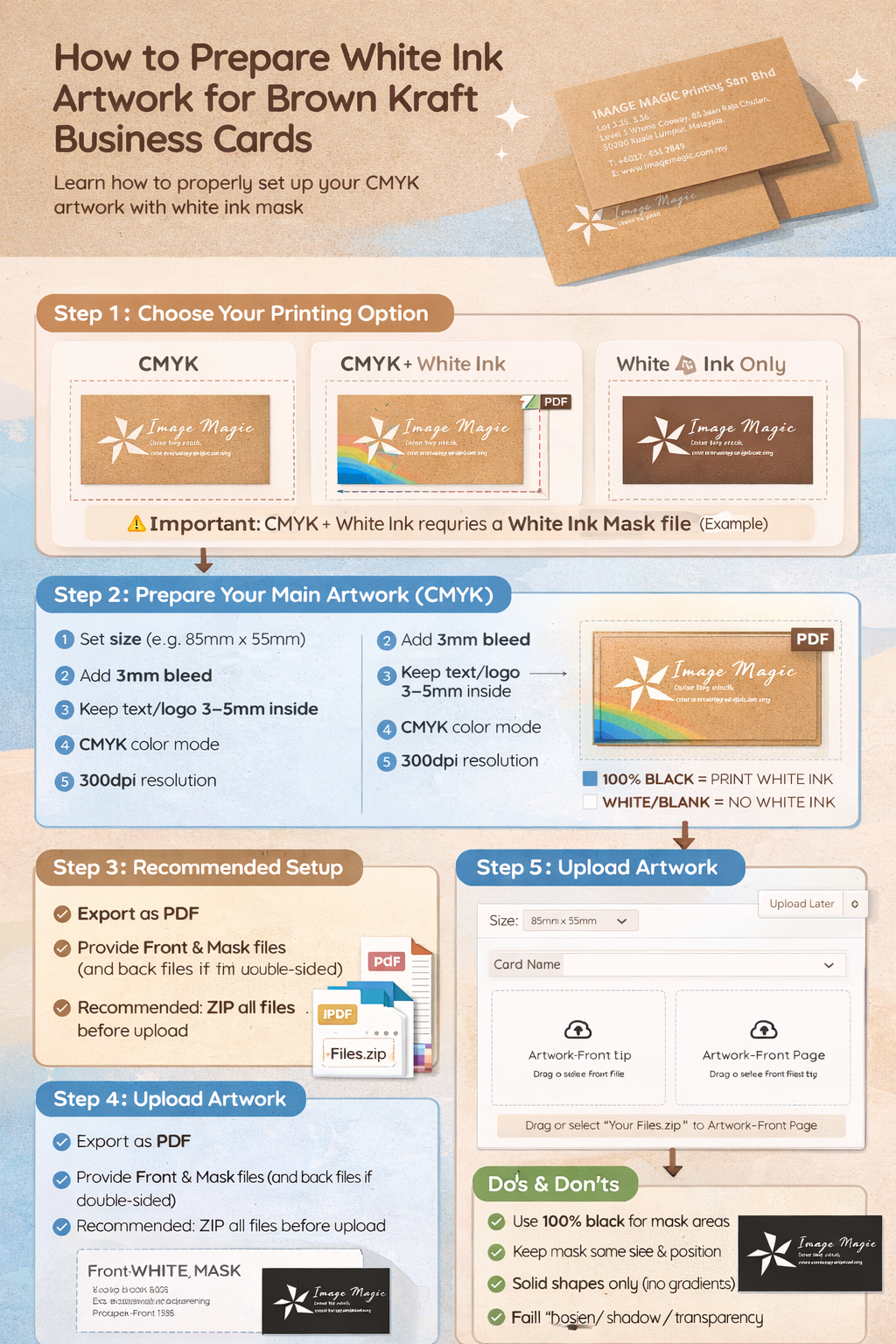
Quick visual guide: CMYK artwork + White Ink Mask preparation.
What is White Ink?
Kraft paper is brown, so light colors may look dull. White ink is used to: (1) print white text/logo, or (2) act as a white underbase so CMYK colors look brighter on Kraft. White ink is typically printed first, then CMYK prints on top.
Step 1 — Choose Your Printing Option
- CMYK (Full Color) — no white ink, artwork prints directly on Kraft.
- CMYK + White Ink — white underbase + CMYK on top (recommended for brighter colors).
- White Ink Only — your design prints in white only.
⚠️ IMPORTANT: White Ink requires a “White Ink Mask” file
A White Ink Mask tells us exactly where to print white ink. The standard rule is: BLACK = print white ink, WHITE/blank = no white ink.
Step 2 — Prepare Your Main Artwork (CMYK)
- Size: Set your document to the ordered size (e.g., 85mm × 55mm).
- Bleed: Add 3mm bleed if background goes to the edge.
- Safe area: Keep important text/logo at least 3–5mm inside from edges.
- Color mode: CMYK recommended.
- Resolution: 300dpi recommended for any images.
- Fonts: Outline or embed fonts before exporting PDF.
Step 3 — Create the White Ink Mask (Simple Rules)
White Ink Mask must be:
- Same size & same position as your main artwork.
- 100% BLACK shapes for white ink areas. Keep background WHITE/blank.
- Solid vector shapes only (no gradient / shadow / transparency / blur).
- Avoid very thin lines or tiny text (white ink may not appear clearly).
Step 4 — Recommended Setup (Adobe Illustrator)
- Open your CMYK artwork in Illustrator.
- Create a new layer on top: WHITE_MASK.
- Copy the objects you want printed in white into this layer.
- Change those objects to 100% BLACK (solid fill). Keep everything else blank.
- Ensure the mask aligns perfectly with the CMYK artwork (no shifting).
Step 5 — Export & File Naming
- Export as PDF (preferred).
- Front (single-sided): provide 2 files:
- Front-CMYK.pdf
- Front-WHITE_MASK.pdf
- Double-sided: if white ink on both sides, provide 4 files:
- Front-CMYK.pdf, Front-WHITE_MASK.pdf
- Back-CMYK.pdf, Back-WHITE_MASK.pdf
- Recommended: ZIP all files into 1 ZIP before uploading.
Common Mistakes to Avoid
- Using grey instead of 100% black (mask must be solid black).
- Using gradients/shadows/transparency on the mask.
- Mask not aligned with your CMYK artwork.
- Forgetting the WHITE_MASK file after selecting White Ink.
Need help preparing White Ink?
WhatsApp us and our team will assist you before printing.